 3ad376dc01 Columns llx_holiday.date_debut and date_fin are pure DATE columns: they hold a
calendar fact, not an absolute instant, so they carry no time and no timezone.
The agenda read them with jdate() defaulting to 'tzserver', then projected them
back with dol_print_date(..., 'tzuserrel') to pick the calendar day box. The
resulting shift equals TZ_user - TZ_server, so any user whose timezone differs
from the server got leaves rendered on the wrong day. Users aligned with the
server saw nothing wrong, which is why this went unnoticed. It also triggers with
no user timezone set at all, since 'tzuserrel' falls back to UTC when
$_SESSION['dol_tz_string'] is empty, shifting leaves on any server east of UTC.
Read and project those dates in GMT instead. This follows the documented core
convention for dates without time ("We suppose dates without time are always gmt
(storage of course + output)", commonobject.class.php; "For date without hour,
date is always GMT for storage and output", extrafields.class.php) and honors the
$daykey contract of $eventarray, which must be midnight GMT of the displayed
calendar day. It also makes the half-day comparison consistent, since
dol_get_first_hour() is already called with 'gmt' a few lines below and only
supports gmt/tzserver anyway.
Two further defects disappear as a side effect: the loop condition
"while ($daykey <= $event->date_end_in_calendar)" compared a user-shifted $daykey
against a server-anchored $datef and rendered one extra day box, and halfday=-1
happened to be correct while halfday=0/1 were not, because the +12h offset
accidentally compensated the timezone shift.
Regular events are untouched: llx_actioncomm.datep is a DATETIME holding a real
instant, and its block still uses 'tzuserrel', so a 9am meeting stays correctly
shifted for a viewer in another timezone. Every other render path already
excludes type_code 'HOLIDAY', so there is no display change elsewhere.
peruser.php carries a copy of the same block and is fixed identically, otherwise
the two views of the same page would contradict each other.
Tested with a real browser (Playwright) against a server running in UTC, driving
the month view as Europe/Paris, America/Cayenne and Pacific/Auckland users on
three existing leaves: 3 failures before, none after, with identical day boxes in
every timezone. A single-day leave of 2026-07-28 was rendered on both 2026-07-27
and 2026-07-28 for the America/Cayenne user before the fix.
|
||
|---|---|---|
| .github | ||
| .phan | ||
| .tx | ||
| dev | ||
| doc | ||
| htdocs | ||
| scripts | ||
| test | ||
| .codeclimate.yml | ||
| .editorconfig | ||
| .gitattributes | ||
| .gitignore | ||
| .mailmap | ||
| .pre-commit-config.yaml | ||
| .travis.yml | ||
| ChangeLog | ||
| composer.json.disabled | ||
| COPYING | ||
| COPYRIGHT | ||
| DCO | ||
| phpstan.neon.dist | ||
| pyproject.toml | ||
| README.md | ||
| robots.txt | ||
| SECURITY.md | ||
DOLIBARR ERP & CRM


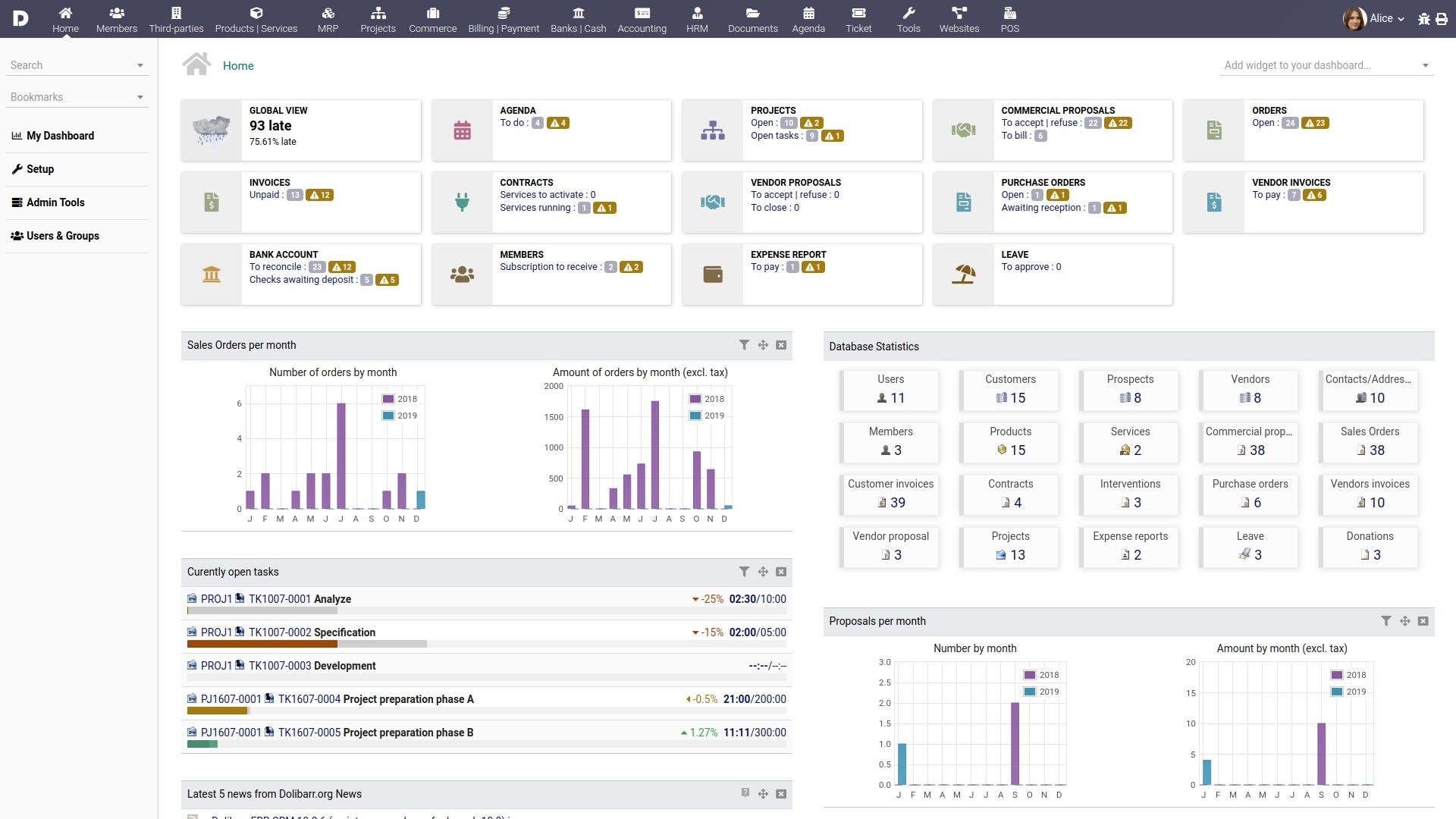
Dolibarr ERP & CRM is a modern software package that helps manage your organization's activities (contacts, quotes, invoices, orders, stocks, agenda, human resources, ecm, manufacturing…).
It's an Open-Source Software suite (written in PHP with JavaScript enhancements) designed for small, medium or large companies, foundations and freelancers.
You can freely use, study, modify or distribute it according to its license.
You can use it as a standalone application or as a web application to access it from the Internet or from a LAN.
Dolibarr has a large community ready to help you, free forums and preferred partners ready to offer commercial support should you need it
LICENSE
Dolibarr is released under the terms of the GNU General Public License as published by the Free Software Foundation; either Version 3 of the License, or (at your option) any later version (GPL-3+).
See the COPYING file for a full copy of the license.
Other licenses apply for some included dependencies. See COPYRIGHT for a full list.
INSTALLING
There is a lot of different solutions to install Dolibarr.
Using packages
If you have low technical skills and you're looking to install Dolibarr ERP/CRM with just few clicks, you can use one of the packaged versions (see next chapter if you have IT knowledge) :
- DoliWamp for Windows
- DoliDeb for Debian, Ubuntu
- DoliRpm for Red Hat, Fedora, OpenSuse, Mandriva or Mageia
- The Docker image (see chapter "Using Docker")
Releases can be downloaded from official website.
Using the generic step by step setup (recommended for IT users)
You can use any web server supporting PHP (Apache, Nginx, ...) and a supported database (MariaDB, MySQL or PostgreSQL) to install the standard version:
-
Verify that your installed PHP version is supported see PHP support.
-
Uncompress the downloaded .zip archive to copy the
dolibarr/htdocsdirectory and all its files inside your web server root or get the files directly from GitHub (recommended if you know git as it makes it easier if you want to upgrade later):git clone https://github.com/dolibarr/dolibarr -b x.y(where x.y is the main version like 9.0, 19.0, ...) -
Set up your web server to use
dolibarr/htdocsas root if your web server does not already define a directory to point to. -
Create an empty
htdocs/conf/conf.phpfile and set write permissions for your web server user (write permission will be removed once install is finished) -
From your browser, go to the dolibarr "install/" page
The URL will depend on how your web configuration directs to your dolibarr installation. It may look like:
http://localhost/dolibarr/htdocs/install/or
http://localhost/dolibarr/install/or
http://yourdolibarrvirtualhost/install/ -
Follow the installer instructions
Using Docker images
Dolibarr is also available as a Docker image. Installation instructions are available here.
Using ready to use SaaS/Cloud offers
If you lack the time to install it yourself, consider exploring commercial 'ready-to-use' Cloud offerings (refer to https://saas.dolibarr.org). Keep in mind that this third option comes with associated costs.
UPGRADING
Dolibarr supports upgrading, usually without the need for any (commercial) support (depending on if you use any commercial extensions). It supports upgrading all the way from any version after 2.8 without breakage. This is unique in the ERP ecosystem and a benefit our users highly appreciate!
Follow these step-by-step instructions to seamlessly upgrade Dolibarr to the latest version:
- At first make a backup of your Dolibarr files & then see
- Verify that your installed PHP version is supported by the new version see PHP support.
- Overwrite all old files from the 'dolibarr' directory with files provided in the new version's package.
- At your next access, Dolibarr will redirect you to the "install/" page to follow the upgrade process.
If an
install.lockfile exists to lock any other upgrade process, the application will ask you to remove the file manually (you should find theinstall.lockfile in the directory used to store generated and uploaded documents, in most cases, it is the directory called "documents").
WHAT'S NEW
See the ChangeLog file.
FEATURES
Main application/modules (all optional)
- Third-Parties Management: Customers, Prospects (Leads) and/or Suppliers + Contacts
- Members/Membership/Foundation management
Product Management
- Products and/or Services catalogue
- Stock / Warehouse management + Inventory
- Barcodes
- Batches / Lots / Serials
- Product Variants
- Bill of Materials (BOM)
- Manufacturing Orders (MO)
- Workstations / Workplaces
Customer/Sales Management
- Customers/Prospects + Contacts management
- Opportunities or Leads management
- Commercial proposals management (online signing)
- Customer Orders management
- Contracts/Subscription management
- Interventions management
- Ticket System (+ Knowledge management)
- Partnership management
- Shipping management
- Customer Invoices/Credit notes and payment management
- Point of Sale (POS)
Supplier/Purchase Management
- Suppliers/Vendors + Contacts
- Supplier (pricing) requests
- Purchase Orders management
- Delivery/Reception
- Supplier Invoices/Credit notes and payment management
- INCOTERMS
Finance/Accounting
- Invoices/Payments
- Bank accounts management
- Direct debit and Credit transfer management (European SEPA)
- Accounting management
- Donations management
- Loan management
- Margins
- Reports
Collaboration
- Shared calendar/agenda (with
icalandvcalimport/export for third-party tools integration) - Projects & Tasks management
- Event organization
- Ticket System
- Surveys
HR - Human Resources Management
- Employee leave management
- Expense reports
- Recruitment management
- Employee/staff management
- Timesheets
Other application/modules
- Electronic Document Management (EDM)
- Bookmarks
- Reporting
- Data export/import
- Barcodes
- LDAP connectivity
- Click-To-Dial integration
- Mass emailing
- RSS integration
- Social platforms linking
- Payment platforms integration (PayPal, Stripe, Paybox...)
- Email-Collector
- AI support via API
(around 100 modules available by default, 1000+ addons at the official marketplace Dolistore.com)
Other general features
- Multi-Language Support (Localization in most major languages)
- Multi-users and groups with finely-grained rights
- Multi-Currency
- Multi-Company (by adding an external module)
- Very user-friendly and easy to use
- Customizable dashboards
- Highly customizable: enable only the modules you need, add user personalized fields, choose your skin, several menu managers (can be used by internal users as a back-office with a particular menu, or by external users as a front-office with another one)
- APIs (REST, SOAP)
- Code that is easy to understand, maintain and develop (PHP with no heavy framework; trigger and hook architecture)
- Support a lot of country-specific features:
- Spanish Tax RE and IRPF
- French NPR VAT rate (VAT called "Non Perçue Récupérable" for DOM-TOM)
- Canadian double taxes (federal/province) and other countries using cumulative VAT
- Tunisian tax stamp
- Argentina invoice numbering using A,B,C...
- Greece fetch customer vat details from AADE, all invoice types, MyData(external free module)
- ZATCA e-invoicing QR-Code
- Compatible with European directives (2006/112/CE ... 2010/45/UE)
- Compatible with data privacy rules (Europe's GDPR, ...)
- ...
- Flexible PDF & ODT generation for invoices, proposals, orders...
- ...
System Environment / Requirements
- PHP
- MariaDB, MySQL or PostgreSQL
- Compatible with all Cloud solutions that match PHP & MySQL or PostgreSQL prerequisites.
See exact requirements on the Wiki
Extending
Dolibarr can be extended with a lot of other external applications or modules from third-party developers available at the DoliStore.
WHAT DOLIBARR CAN'T DO YET
These are features that Dolibarr does not yet fully support:
- Tasks dependencies in projects
- Payroll module
- Native embedded Webmail, but you can send email to contacts in Dolibarr with e.g. offers, invoices, etc.
- Dolibarr can't do coffee (yet)
DOCUMENTATION
Administrator, user, developer and translator's documentation are available along with other community resources in the Wiki.
CONTRIBUTING AND RELEASE PROCESS
This project exists thanks to all the people who contribute. Please read the instructions on how to contribute (report a bug/error, a feature request, send code, ...) [Contributing]
A View on Contributors:

The release process is described into the file dev/build/makepack-howto.md
CREDITS
Dolibarr is the work of many contributors over the years and uses some fine PHP libraries.
See COPYRIGHT file.
NEWS AND SOCIAL NETWORKS
Follow Dolibarr project on:
Sponsors
Support this project by becoming a sponsor. Your logo will show up here. 🙏 [Become a sponsor/backer]