 3216098ab5 * NEW : add ModuleBuilder object-tabs map and filter helpers Add getModuleBuilderObjectTabs() (source-of-truth map of optional object tabs) and filterEnabledTabs() (sanitizes user-requested tab keys against the map). Covered by ModuleBuilderLibTest. Next: add BEGIN/END markers around tab flags and blocks in template lib (Task 2) * NEW : wrap object tab flags and blocks with MODULEBUILDER markers Surround each optional tab flag declaration (TABFLAG) and each prepareHead tab block (TAB) with BEGIN/END MODULEBUILDER comment markers, so the generator can purge a whole tab atomically while keeping $h and $head intact. Card tab is not wrapped (always generated). Next: add tab selection checkboxes to the newobject form in modulebuilder/index.php (Task 3) * NEW : add object tab selection checkboxes to newobject form Render one checkbox per optional tab (contact, note, document, agenda) in the ModuleBuilder newobject form, all checked by default and reflecting posted state on redisplay. Next: handle enabledtab in initobject — exclude files, purge blocks, hardcode flags (Task 4) * NEW : apply object tab selection during object generation Excludes page files of unselected tabs, purges their prepareHead flag and block via MODULEBUILDER markers, and hardcodes the show flag to 1 for selected tabs. Emits a best-effort warning when regenerating an existing object. Next: add language keys EnabledTabsForObject(Help) + WarningTabSelectionOnRegeneration (Task 5) * NEW : add language keys for object tab selection Next: add ChangeLog entry (Task 6) * DOC : changelog entry for ModuleBuilder selectable object tabs * FIX : purge agenda card widget when agenda tab is excluded Audit finding: myobject_card.php hardcodes a 'SeeAll' link to myobject_agenda.php in an event widget. When the agenda tab is excluded the page is not generated, leaving a latent dead link if the widget is enabled. Wrap the widget with MODULEBUILDER TAB AGENDA markers and purge it from the generated card when the agenda tab is not selected. Next: functional verification (step 5 of dev workflow) * FIX : check file operation results when applying object tab selection PR review: align with the nogeneratelines pattern by checking the return of removePatternFromFile/dolReplaceInFile and raising $error + dol_syslog with the failing tab/file context, instead of ignoring silent write failures during object generation. Add PR reference to the changelog entry. * FIX : do not abort object generation when nogeneratelines targets a missing file The nogeneratelines handler purges the MODULEBUILDER LINES block from class, API and card files. When API generation is disabled the api_<module>.class.php file does not exist, so removePatternFromFile returns false and $error was incremented, which skipped the whole success path (name substitution, rebuildObjectClass, $tabobj assignment). Generated classes kept the literal 'class MyObject', so dolGetListOfObjectClasses listed every object as MyObject. Guard each purge with file_exists so a missing optional file is skipped. * FIX : keep module descriptor out of the blanket name substitution The 'substitute all module php files' pass applied the object/module name map to every .php file including the module descriptor. That rewrote the persistent /* ... MODULEBUILDER TOPMENU/LEFTMENU MYOBJECT */ marker placeholders to the first object name, so generating a second object could no longer find them (checkExistComment returned -1, 'comments not found for section Menus' warning) and its menu entries were not inserted. Skip the descriptor in that loop: its module name is already resolved by initmodule and its object entries are added by the dedicated menu/permission blocks. * FIX : preserve MODULEBUILDER markers when substituting the module descriptor The previous commit only skipped the descriptor in the secondary substitution pass, but the primary pass (over $filetogenerate, which includes the descriptor) still rewrote its persistent /* ... MODULEBUILDER TOPMENU/LEFTMENU MYOBJECT */ markers to the first object name. Those markers cannot simply be excluded from substitution because the descriptor also has functional MYOBJECT/MYMODULE tokens (e.g. the MYMODULE_MYOBJECT_ADDON numbering constant) that must be resolved. Add dolReplaceInFilePreservingModuleBuilderMarkers(): it hides every MODULEBUILDER marker behind a sentinel, applies the substitution, then restores the markers verbatim. Use it for the descriptor in the primary pass; the descriptor stays excluded from the secondary pass. Generating a second object now finds the markers (checkExistComment) and inserts its menu entries without warning. Verified by CLI: markers preserved across two successive objects, while content (rights, exports, addon constant) is correctly substituted. * FIX : silence phan on the new ModuleBuilder test and typed closure CI phan (diff-only) flagged the freshly added test file: PhanUndeclaredExtendedClass (\CommonClassTest) and PhanUndeclaredMethod (assertSame), like the sibling NamingContractTest. Add the same @phan-file-suppress block (plus PhanTypeMismatchArgumentProbablyReal for the non-array guard test case). Also type the preg_replace_callback parameter (array $matches) to clear PhanPluginUnknownClosureParamType. phpstan is already green; no phpstan annotations added. * FIX : drop closure in marker-preserving substitution to satisfy phan phan's PhanPluginUnknownArrayClosureParamType wanted key/value types on the preg_replace_callback closure parameter. Replace the callback with preg_match_all plus a str_replace loop over the unique markers: same behaviour, no closure, no plugin warning. --------- Co-authored-by: Laurent Destailleur <eldy@destailleur.fr> |
||
|---|---|---|
| .github | ||
| .phan | ||
| .tx | ||
| dev | ||
| doc | ||
| htdocs | ||
| scripts | ||
| test | ||
| .codeclimate.yml | ||
| .editorconfig | ||
| .gitattributes | ||
| .gitignore | ||
| .mailmap | ||
| .pre-commit-config.yaml | ||
| .travis.yml | ||
| AGENTS.md | ||
| ChangeLog | ||
| composer.json.disabled | ||
| COPYING | ||
| COPYRIGHT | ||
| DCO | ||
| phpstan.neon.dist | ||
| pyproject.toml | ||
| README.md | ||
| robots.txt | ||
| SECURITY.md | ||
DOLIBARR ERP & CRM


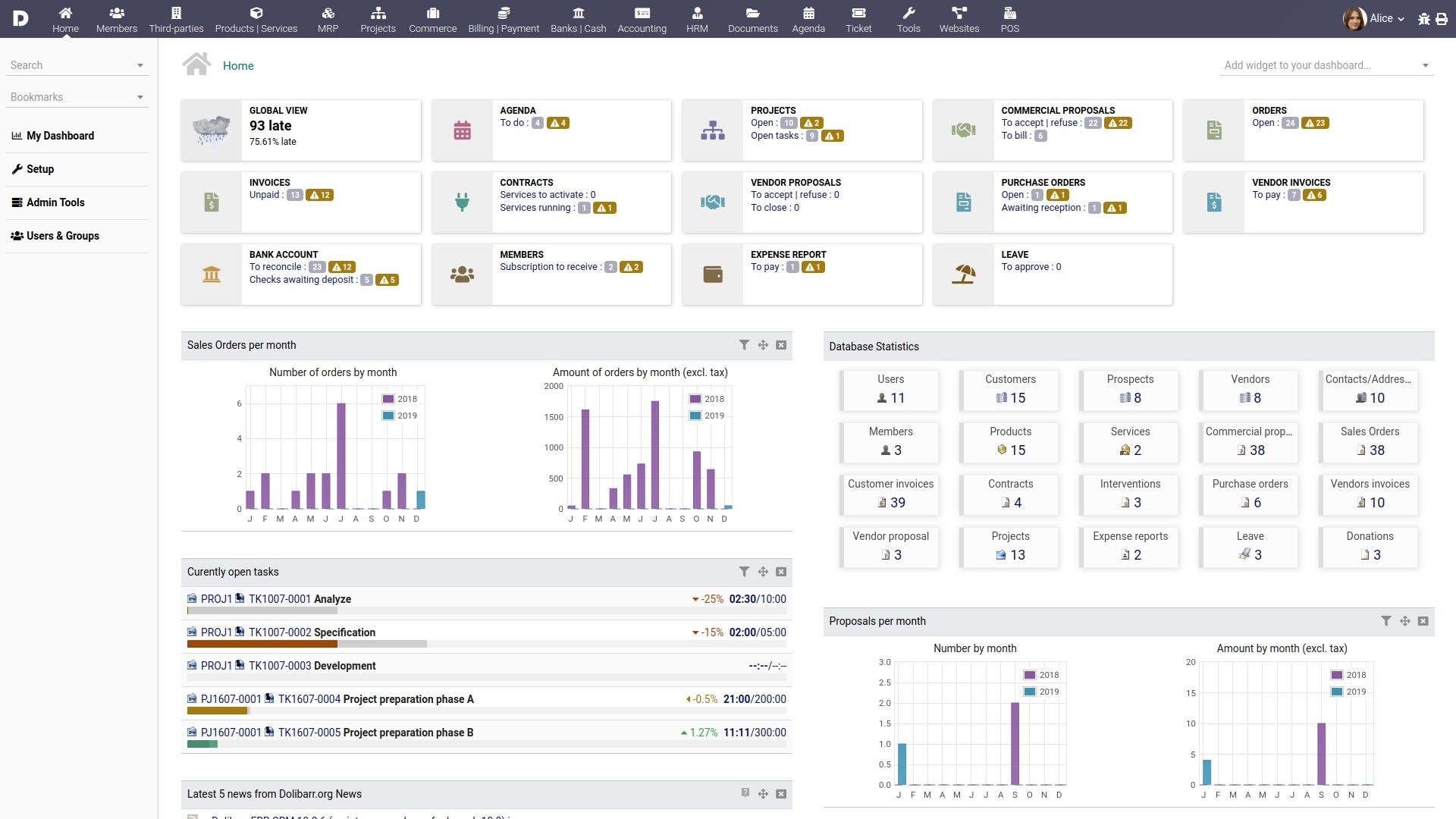
Dolibarr ERP & CRM is a modern software package that helps manage your organization's activities (contacts, quotes, invoices, orders, stocks, agenda, human resources, ecm, manufacturing…).
It's an Open-Source Software suite (written in PHP with JavaScript enhancements) designed for small, medium or large companies, foundations and freelancers.
You can freely use, study, modify or distribute it according to its license.
You can use it as a standalone application or as a web application to access it from the Internet or from a LAN.
Dolibarr has a large community ready to help you, free forums and preferred partners ready to offer commercial support should you need it
LICENSE
Dolibarr is released under the terms of the GNU General Public License as published by the Free Software Foundation; either Version 3 of the License, or (at your option) any later version (GPL-3+).
See the COPYING file for a full copy of the license.
Other licenses apply for some included dependencies. See COPYRIGHT for a full list.
INSTALLING
There is a lot of different solutions to install Dolibarr.
Using packages
If you have low technical skills and you're looking to install Dolibarr ERP/CRM with just few clicks, you can use one of the packaged versions (see next chapter if you have IT knowledge) :
- DoliWamp for Windows
- DoliDeb for Debian, Ubuntu
- DoliRpm for Red Hat, Fedora, OpenSuse, Mandriva or Mageia
- The Docker image (see chapter "Using Docker")
Releases can be downloaded from official website.
Using the generic step by step setup (recommended for IT users)
You can use any web server supporting PHP (Apache, Nginx, ...) and a supported database (MariaDB, MySQL or PostgreSQL) to install the standard version:
-
Verify that your installed PHP version is supported see PHP support.
-
Uncompress the downloaded .zip archive to copy the
dolibarr/htdocsdirectory and all its files inside your web server root or get the files directly from GitHub (recommended if you know git as it makes it easier if you want to upgrade later):git clone https://github.com/dolibarr/dolibarr -b x.y(where x.y is the main version like 9.0, 19.0, ...) -
Set up your web server to use
dolibarr/htdocsas root if your web server does not already define a directory to point to. -
Create an empty
htdocs/conf/conf.phpfile and set write permissions for your web server user (write permission will be removed once install is finished) -
From your browser, go to the dolibarr "install/" page
The URL will depend on how your web configuration directs to your dolibarr installation. It may look like:
http://localhost/dolibarr/htdocs/install/or
http://localhost/dolibarr/install/or
http://yourdolibarrvirtualhost/install/ -
Follow the installer instructions
Using Docker images
Dolibarr is also available as a Docker image. Installation instructions are available here.
Using ready to use SaaS/Cloud offers
If you lack the time to install it yourself, consider exploring commercial 'ready-to-use' Cloud offerings (refer to https://saas.dolibarr.org). Keep in mind that this third option comes with associated costs.
UPGRADING
Dolibarr supports upgrading, usually without the need for any (commercial) support (depending on if you use any commercial extensions). It supports upgrading all the way from any version after 2.8 without breakage. This is unique in the ERP ecosystem and a benefit our users highly appreciate!
Follow these step-by-step instructions to seamlessly upgrade Dolibarr to the latest version:
- At first make a backup of your Dolibarr files & then see
- Verify that your installed PHP version is supported by the new version see PHP support.
- Overwrite all old files from the 'dolibarr' directory with files provided in the new version's package.
- At your next access, Dolibarr will redirect you to the "install/" page to follow the upgrade process.
If an
install.lockfile exists to lock any other upgrade process, the application will ask you to remove the file manually (you should find theinstall.lockfile in the directory used to store generated and uploaded documents, in most cases, it is the directory called "documents").
WHAT'S NEW
See the ChangeLog file.
FEATURES
Main application/modules (all optional)
- Third-Parties Management: Customers, Prospects (Leads) and/or Suppliers + Contacts
- Members/Membership/Foundation management
Product Management
- Products and/or Services catalogue
- Stock / Warehouse management + Inventory
- Barcodes
- Batches / Lots / Serials
- Product Variants
- Bill of Materials (BOM)
- Manufacturing Orders (MO)
- Workstations / Workplaces
Customer/Sales Management
- Customers/Prospects + Contacts management
- Opportunities or Leads management
- Commercial proposals management (online signing)
- Customer Orders management
- Contracts/Subscription management
- Interventions management
- Ticket System (+ Knowledge management)
- Partnership management
- Shipping management
- Customer Invoices/Credit notes and payment management
- Point of Sale (POS)
Supplier/Purchase Management
- Suppliers/Vendors + Contacts
- Supplier (pricing) requests
- Purchase Orders management
- Delivery/Reception
- Supplier Invoices/Credit notes and payment management
- INCOTERMS
Finance/Accounting
- Invoices/Payments
- Bank accounts management
- Direct debit and Credit transfer management (European SEPA)
- Accounting management
- Donations management
- Loan management
- Margins
- Reports
Collaboration
- Shared calendar/agenda (with
icalandvcalimport/export for third-party tools integration) - Projects & Tasks management
- Event organization
- Ticket System
- Surveys
HR - Human Resources Management
- Employee leave management
- Expense reports
- Recruitment management
- Employee/staff management
- Timesheets
Other application/modules
- Electronic Document Management (EDM)
- Bookmarks
- Reporting
- Data export/import
- Barcodes
- LDAP connectivity
- Click-To-Dial integration
- Mass emailing
- RSS integration
- Social platforms linking
- Payment platforms integration (PayPal, Stripe, Paybox...)
- Email-Collector
- AI support via API
(around 100 modules available by default, 1000+ addons at the official marketplace Dolistore.com)
Other general features
- Multi-Language Support (Localization in most major languages)
- Multi-users and groups with finely-grained rights
- Multi-Currency
- Multi-Company (by adding an external module)
- Very user-friendly and easy to use
- Customizable dashboards
- Highly customizable: enable only the modules you need, add user personalized fields, choose your skin, several menu managers (can be used by internal users as a back-office with a particular menu, or by external users as a front-office with another one)
- APIs (REST, SOAP)
- Code that is easy to understand, maintain and develop (PHP with no heavy framework; trigger and hook architecture)
- Support a lot of country-specific features:
- Spanish Tax RE and IRPF
- French NPR VAT rate (VAT called "Non Perçue Récupérable" for DOM-TOM)
- Canadian double taxes (federal/province) and other countries using cumulative VAT
- Tunisian tax stamp
- Argentina invoice numbering using A,B,C...
- Greece fetch customer vat details from AADE, all invoice types, MyData(external free module)
- ZATCA e-invoicing QR-Code
- Compatible with European directives (2006/112/CE ... 2010/45/UE)
- Compatible with data privacy rules (Europe's GDPR, ...)
- ...
- Flexible PDF & ODT generation for invoices, proposals, orders...
- ...
System Environment / Requirements
- PHP
- MariaDB, MySQL or PostgreSQL
- Compatible with all Cloud solutions that match PHP & MySQL or PostgreSQL prerequisites.
See exact requirements on the Wiki
Extending
Dolibarr can be extended with a lot of other external applications or modules from third-party developers available at the DoliStore.
WHAT DOLIBARR CAN'T DO YET
These are features that Dolibarr does not yet fully support:
- Tasks dependencies in projects
- Payroll module
- Native embedded Webmail, but you can send email to contacts in Dolibarr with e.g. offers, invoices, etc.
- Dolibarr can't do coffee (yet)
DOCUMENTATION
Administrator, user, developer and translator's documentation are available along with other community resources in the Wiki.
CONTRIBUTING AND RELEASE PROCESS
This project exists thanks to all the people who contribute. Please read the instructions on how to contribute (report a bug/error, a feature request, send code, ...) [Contributing]
A View on Contributors:

The release process is described into the file dev/build/makepack-howto.md
CREDITS
Dolibarr is the work of many contributors over the years and uses some fine PHP libraries.
See COPYRIGHT file.
NEWS AND SOCIAL NETWORKS
Follow Dolibarr project on:
Sponsors
Support this project by becoming a sponsor. Your logo will show up here. 🙏 [Become a sponsor/backer]